Radio: From Live Broadcasts to Published Clips—The Best Step-by-Step Workflows

A highlight has just aired. To make the most of its potential on social media, you need to be able to spot it, turn it into a clip, and post it while it’s still fresh—without interrupting the live broadcast or mobilizing the entire newsroom.
On a daily basis, radio teams face two needs: reacting in real time during a broadcast or revisiting a program that has already aired to highlight its best moments. In this article, we detail the workflows for Live Clipping and Smart Clip, from selection to publication. For radio stations that film their shows, we’ll also explore how Reframe makes it easier to create vertical formats optimized for social media.
Scenario 1: Share a highlight from the live stream using Live Clipping
On a morning show or talk show, everyone in the studio knows how to recognize a great moment when it happens: a punchline, a debate that heats up, a guest who says something unexpected. The problem isn’t identifying these moments, but managing to post them quickly while the show is still on the air.
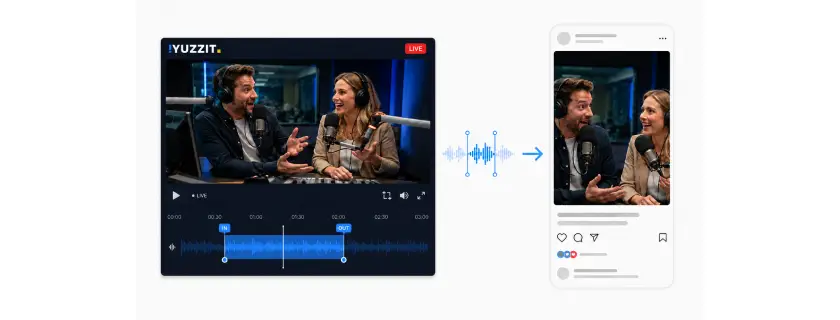
That’s the whole point of live clipping. The team can cut a clip directly from the live feed, without waiting for the program to end or having to sift through an hour of footage afterward to find the right segment. It’s this ability to act in real time—while the live broadcast is still airing—that saves the most precious time in a newsroom: the time between when something happens and when the audience sees it on social media.
Here's what this journey looks like, step by step, and how live clipping changes at each stage.
1. Spotting key moments live.
A host, a journalist, or a social media manager identifies the segment to be edited, usually by watching the show as it airs.
2. Real-time extraction from the stream.
This is the heart of live clipping. The live feed—whether audio or video—is clipped to the exact segment identified in real time, while the broadcast continues. The team doesn’t need to wait for the program to end, cut the live feed, or retrieve a file from another system: the clip already exists, ready to be edited, just seconds after the moment that inspired it. It is this step, more than any other, that makes the difference between a clip released while the topic is still fresh and one released the next day.
This responsiveness does not necessarily depend on a fixed workstation. Clips can also be edited on a mobile device, allowing teams to retrieve a clip wherever they are and integrate it immediately into their production workflow.
“With mobile video editing, it’s become even easier to capture our videos on a daily basis, no matter where we are. This allows us to use the audio and/or video in our edits, which we create directly on our mobile devices.”Misha Agard, then Broadcast and Technical Coordinator at Europe 2, Lagardère Group
3. Cropping and formatting.
When it comes to radio with video, there’s an added challenge: the feed comes from a fixed camera that captures the entire studio in a wide shot—hosts, guests, and sometimes a stage manager who walks into the frame. Manually cropping the footage to keep the right person in the center at all times is a time-consuming task, even for a seasoned editor.
That's where Reframe steps in, complementing live clipping. It detects who is speaking and adjusts the framing accordingly, without requiring a cameraman to follow the conversation in real time. The resulting clip isn’t just a randomly cropped section of the video: it follows the flow of the conversation, which is particularly important in a multi-voice debate where the topic shifts from one speaker to another—and now the frame does too. Automatic subtitles and branding in the show’s colors are added immediately afterward, directly to the same, already-cropped clip.
4. Quick proofread.
The person who initiated the edit checks to make sure the result matches what they had in mind, adjusts a subtitle or the framing if necessary, and then approves it.
5. Publication.
Directly to the target networks, without manual export or file transfers between multiple tools.
This organization is already part of the daily routine for the Europe 1 teams. Philippe Da Costa, who was in charge of social media and video at the time of this interview, explains:
“Yuzzit is a tool that allows us to respond quickly when sharing information and statements from our guests. On the Europe 1 social media team, we use it to extract videos, add subtitles, and post them directly to our social media channels. Community managers use it every day. It saves us a considerable amount of time when it comes to highlighting on-air moments in formats tailored to different platforms.”
Philippe Da Costa, then head of social media and video at Europe 1
Ultimately, live responsiveness hinges first and foremost on the ability to edit as the live broadcast unfolds, without delay. Reframe then removes an additional hurdle—one specific to filmed radio shows—during the editing process. Together, these tools enable a reporter or head of social media who spots the right moment to start the editing process themselves, without any special technical skills, and have the clip ready while the show is still on the air.
Scenario 2: Promote a previously aired show using Smart Clip
A radio station that has been on the air for several years already has hours and hours of pre-recorded programming: interviews, segments, debates, and moments that went over well on the air—both audio and video. This content exists, it’s high-quality, and it remains largely underutilized because repurposing it for social media requires the same amount of effort as producing a live clip, without the sense of urgency to justify dedicating time to it.
That's where the "long to short" Smart Clip feature comes in: it lets you start with a long, pre-recorded show and extract the best parts from it, without having to start from scratch every time. Here's how a Smart Clip session actually works, and how Reframe comes into play for filmed radio shows.
1. Importing long-form content.
The entire program—a one-hour morning show, a debate, and an interview lasting about 20 minutes—is imported as-is, without the need to edit it beforehand or manually note timecodes.
2. Automatic identification of the best passages.
The tool scans the content and, within minutes, suggests a selection of clips with high potential: a highlight in the conversation, a memorable response, or a passage that stands on its own even out of context. This automatic identification saves a team member from having to listen to or watch the entire program again to find the best moments.
3. Editorial approval.
The team takes charge: from among the suggested passages, it chooses the ones it prefers.
4. Cropping and formatting.
For a video clip, simply extracting a relevant segment isn't enough if it remains in its original horizontal format: on social media platforms, content that isn't natively vertical is at a disadvantage—it's less prominently featured and less likely to be watched all the way through.
Reframe is applied directly to each selected clip and reformats it vertically using the same logic as for live broadcasts: detection of the speaker(s), with the framing adjusting throughout the sequence using a split screen to create a relevant and complete frame. An interview recorded six months ago in the studio is thus presented in a format ready for publication, with a frame that makes visual sense—rather than a randomly cropped center of the image. Subtitles and graphics are then applied to this already-cropped footage.
5. Publication or scheduling.
Approved clips can be published immediately or spread out over several days, allowing for regular content updates on social media based on a single episode that has already aired.
For the team, this changes the way they view the media library. A program that has already aired is no longer static content: it’s a pool of potential clips that can be pulled as needed, without having to bring in an editor every time we want to extract a clip. Teams that don’t have enough time to handle everything on a just-in-time basis can revisit these archives later, with the same level of production quality, and keep their social media channels updated even on days without major live broadcasts.
Key takeaway: Live and archived content—two workflows, one approach
Live Clipping and Smart Clip address two different needs in everyday radio operations: reacting quickly to a highlight during a live broadcast, or revisiting a program that has already aired to highlight its best moments. In both cases, the goal remains the same: to reduce the time between identifying content and publishing it on social media.
For filmed radio segments, there’s an additional challenge: transforming a wide-angle studio shot into a vertical format suitable for mobile devices. Reframe automates this step, whether for a clip created live or an archive clip edited later. This allows the team to focus on selecting which moments to publish, without having to manually handle the cropping.
Ultimately, these workflows make it possible to make better use of all the content produced by the radio station. Highlights from live broadcasts can be published while they’re still timely, while past shows become a regular source of new clips—without adding a significant editing burden to the teams.
Test these workflows with your own content. Discover how Yuzzit can be integrated into your radio station’s daily operations, from live editing to social media posting. Request a personalized demo based on your specific use cases and content.
Frequently Asked Questions
Do you need video editing skills to use Live Clipping or Smart Clip?
No, that’s exactly what these workflows prevent. Someone who identifies a key moment or approves a clip suggested by Smart Clip doesn’t need to be an expert in editing software: cutting, cropping, subtitling, and branding are all done automatically, allowing the team to focus on editorial decisions rather than technical tasks.
How long does it actually take to post a clip during a live stream?
It depends on the length of the clip and the amount of time the team allows for review before approval, but historically, most of the delay has come from cropping and formatting, not from identifying the clip. By automating this part of the process, the time between identifying the clip and its publication is measured in minutes rather than hours, which makes it possible to release a clip while the show is still airing.
Share this article

.webp)

Subscribe to our newsletter!
Get our latest news and valuable tips for creating your videos!
Sign up now for our Yuzz’letter!
Our Latest Articles

Presidential Campaign: How to Respond Within Minutes to Every TV and Radio Appearance
Radio: From Live Broadcasts to Published Clips—The Best Step-by-Step Workflows