


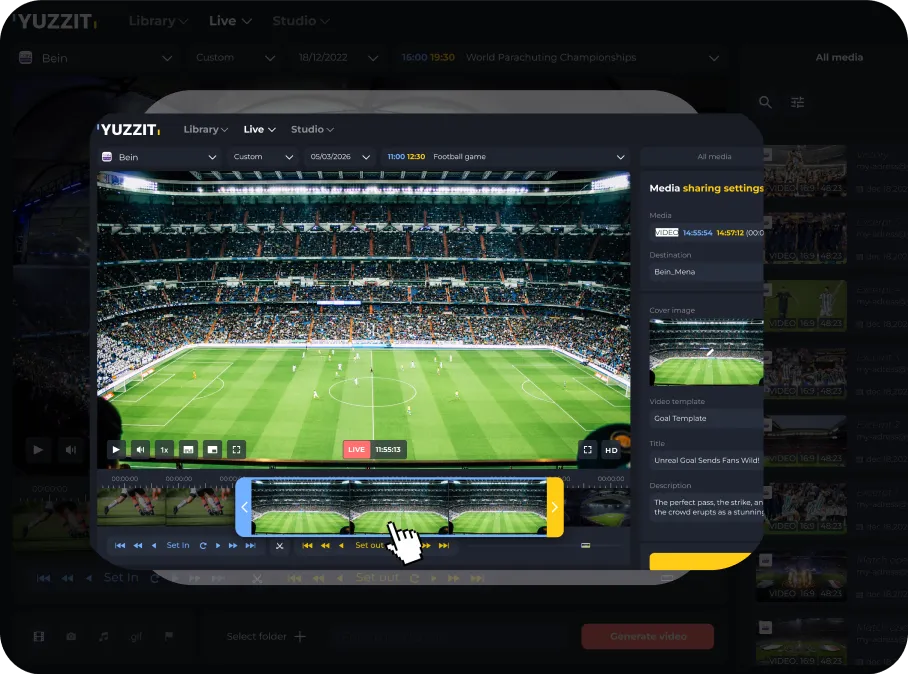
Publish live video clips without slowing down the editorial process
Editorial teams work under pressure. However, when it comes to extracting video clips from live broadcasts, many still rely on cumbersome post-production workflows. Yuzzit, our online video solution, is changing the game by simplifying this process.
Thanks to itslive clippingfeature, journalists and digital producers can select a highlight, edit it quickly, and publish it while the live broadcast is still in progress. No downloads, no complex editing software, no unnecessary waiting.
Whether it's a press conference, breaking news, or a sporting event, Yuzzit lets you turn a live stream into a publish-ready video in seconds.

A video tool designed for editorial workflows

Yuzzit is designed for editorial and digital production teams, enabling them to:
- Create video highlights in real time
- Publish immediately to social media and digital platforms
- Produce short content tailored to mobile-first audiences
- Accelerate content distribution without increasing production teams
Whether it's politics, current events, or sports, Yuzzit allows editorial teams to clip and publish as events unfold.
Why editorial teams choose Yuzzit
Publish key moments 10 times faster
Capture important moments as they happen and instantly turn them into clips that are ready to share.
From live to social media in less than 60 seconds
Clip, edit, and publish your videos without leaving the platform.
Intuitive SaaS solution
Your editorial teams no longer need traditional editing tools to produce professional clips.
Designed for real-time editorial workflows
Yuzzit integrates easily into broadcast environments and digital publishing pipelines.
Covering multiple events simultaneously
Press conferences, political debates, sporting events, or breaking news: your team can produce several clips at the same time.
How editorial teams use live clipping
Let's take the example of a press conference or live news coverage. While the live broadcast is underway:
1. Monitor the live stream
Journalists watch the stream directly in the Yuzzit interface.
2. Identify the key moment
As soon as an important statement is made, the editor marks the beginning and end of the moment.
3. Instantly generate the clip
Yuzzit allows you to instantly cut a video clip from markers added to the live stream. The video is generated with a single click.
4. Enhance the video
Add subtitles, a title, overlays, or your logo according to your editorial standards.
5. Publish in seconds
Send the clip directly to your website, social media accounts, or CMS.
Total time: less than 60 seconds!
Insteadof publishing after the live event, your editorial team publishes during the event. That's what changes editorial coverage.
What the editorial teams say
Yuzzit gives us everything we need in one place: live view, clipping, subtitles, branding. This simplifies our workflow and eliminates the need to use multiple tools. And the solution ticked all the boxes: fast, easy to use, and powerful enough for our workflows. Even team members who aren't editors can create clean, publish-ready clips in minutes.
Víctor Fabián B. Project Manager
Heraldo Media Group
Frequently Asked Questions
What is live clipping in an editorial context?
Live clipping allows editorial teams to extract video clips directly from a live stream while it is still in progress. Journalists can thus create video highlights in real time, without waiting for the live broadcast to end. This approach greatly speeds up the video workflow in newsrooms and allows content to be published immediately.
What tool should you use to create video highlights in real time?
Newsrooms use live video clipping tools such as our Yuzzit solution, which can capture key moments from a live stream and turn them into clips that are ready to publish. Yuzzit allows you to clip, edit, and publish to social media or a website from a single interface. This simplifies the production of video highlights for editorial teams.
How long does it take to publish a clip from a live stream?
In an optimized editorial workflow, creating and publishing a clip can take less than a minute. Once the moment has been selected, the editor can add a template that includes a title, subtitles, or quick graphics, then publish directly to social media or the editorial website. This type of video solution drastically reduces the time between the event and the broadcast of video clips on social media.
Does live clipping work with video feeds already used by an editorial team?
Yes. Live clipping tools are designed to connect to video feeds already used by an editorial team, whether they come from a broadcast system, an encoder, or an online streaming platform. Editorial teams can therefore integrate live clipping into their video production chain without modifying their existing infrastructure.